Neoprene sublimation car coasters are one of the easiest products to make if you want a small craft project that is quick, customizable, and great for gifts or craft shows. They are inexpensive to produce, lightweight to package, and easy to personalize with quotes, patterns, monograms, or seasonal designs. So let’s get started!
Affiliate Disclosure: This post may contain affiliate links. As an affiliate, I may earn a small commission if you purchase through these links at no additional cost to you.

How to Make Sublimation Car Coasters to Sell
I have been making sublimation car coasters for quite a while and they are always a big hit at craft shows. In this tutorial I’m sharing how to design and sublimate neoprene car coasters step-by-step, plus how to package and display them if you plan to sell them. I’m also including a free Canva template that makes designing your coaster layouts much easier. The template uses circle frames so you can simply drag a design into the shape and export it for sublimation.
Download the Free Car Coaster Canva Template
To make designing easier, I created a free Canva template sized for neoprene car coasters. The template includes a six-design layout so you can print multiple coaster designs on one sheet. Subscribers to my Studio Letter can download the template from the printable library. Sign up below and I’ll send the template straight to your inbox.
Once you have the template, you can customize it with quotes, patterns, or graphics to create your own coaster designs.
Why Neoprene Car Coasters Are Great to Make and Sell
Car coasters are one of those products that work well because they are both practical and giftable. They are small enough to be impulse purchases at craft shows, and they are easy to create themed collections. Because the blanks are inexpensive, they are also a great product for experimenting with different design styles.
Each packaged set of two car coasters costs about $0.80 to make including sublimation paper, ink, packaging, and the coaster blanks. Sets like these often sell for around $8 at craft shows, making them an inexpensive product with a strong profit margin.
Want to see how these come together? Watch the full video tutorial where I show the design, printing, and pressing process.
Supplies Used
Here are the supplies I used for this project.
- HTVRONT Auto Heat Press 2
- Epson F170 Sublimation Printer
- A-SUB 125g Sublimation Paper
- Neoprene Sublimation Car Coaster Blanks
- Heat Resistant Tape
- Lint Roller
- Protective Paper
- Retail Packaging Bags
- Retail Display Stand for Craft Shows
If you’d rather buy instead of DIY, you can find my finished sublimation car coaster sets in my Etsy shop. I regularly add new designs, so feel free to check back for seasonal and themed options.
Step 1: Measure Your Car Coaster Blanks
Most neoprene car coasters measure about 2.75 inches, but it’s always a good idea to measure your blanks before designing.
For sublimation projects, I like to design slightly larger than the blank so the print extends past the edge. This helps prevent white borders if placement is slightly off when pressing.
Step 2: Use the Free Canva Template
Open the free Canva template after downloading it from the Studio Letter. The template includes six circle frames on one page, which allows you to print multiple coaster designs at once. Each circle frame is sized slightly larger than the coaster blank so the design prints edge-to-edge after pressing. This layout also makes production much faster if you are making several coasters at once.
Step 3: Add Designs to the Template
Drag your graphics directly into the circle frames. Canva automatically crops the design to the shape.
Try to keep important text slightly away from the edge so it doesn’t get cut off when pressing. You can duplicate the page and swap designs quickly if you want to create multiple variations.
Use Creative Fabrica for Design Elements
If you want to create custom designs quickly, Creative Fabrica is a great resource for graphics.
You can find:
- quote designs
- SVG graphics
- monograms
- seasonal artwork
- pattern backgrounds
Search Creative Fabrica for things like:
- funny car quotes
- monogram circle
- retro quote SVG
- floral PNG
Once you download a graphic, upload it to Canva and drag it into the circle frame in your template. This makes it easy to create unique coaster designs even if you don’t consider yourself a designer.
If you plan to sell your finished car coasters, make sure any graphics, fonts, or design elements you use are licensed for commercial use according to the terms provided by the designer.
Step 4: Print Your Sublimation Designs
After finishing your designs in Canva, download the page as a high-quality PNG or PDF. Print the designs using sublimation paper. Before printing a full batch, it’s always a good idea to print one test page to confirm that your sizing and layout look correct.
Step 5: Prepare the Coaster Blanks
Before pressing, use a lint roller on the coaster surface to remove any dust or fibers. Even tiny particles can affect sublimation results.

Place the coasters faced down on top of the sublimation print, centering each one on a circle. Secure it with heat tape.
Step 6: Press the Coasters
- Place protective paper on the lower plate of your heat press.
- Position the coaster with the sublimation print facing down and cover the top with another sheet of protective paper.
- Press according to the recommended time and temperature provided by your blank manufacturer. (I press mine at 395F for 60 secs.)
- After pressing, carefully remove the sublimation paper.
You’ll notice the colors appear much more vibrant after the design transfers.
Step 8: Let the Coasters Cool and Flatten
Neoprene car coasters often curl slightly after pressing because of the heat. This is normal. To flatten them, place the finished coaster into a heat press that is turned off and close the press for a few minutes while it cools. The light pressure helps the coaster return to a flat shape. If you don’t have a second press available, you can also place the coaster under something heavy, such as a stack of books, while it cools. Flattening them before packaging helps the finished product look cleaner and sit nicely in display stands.
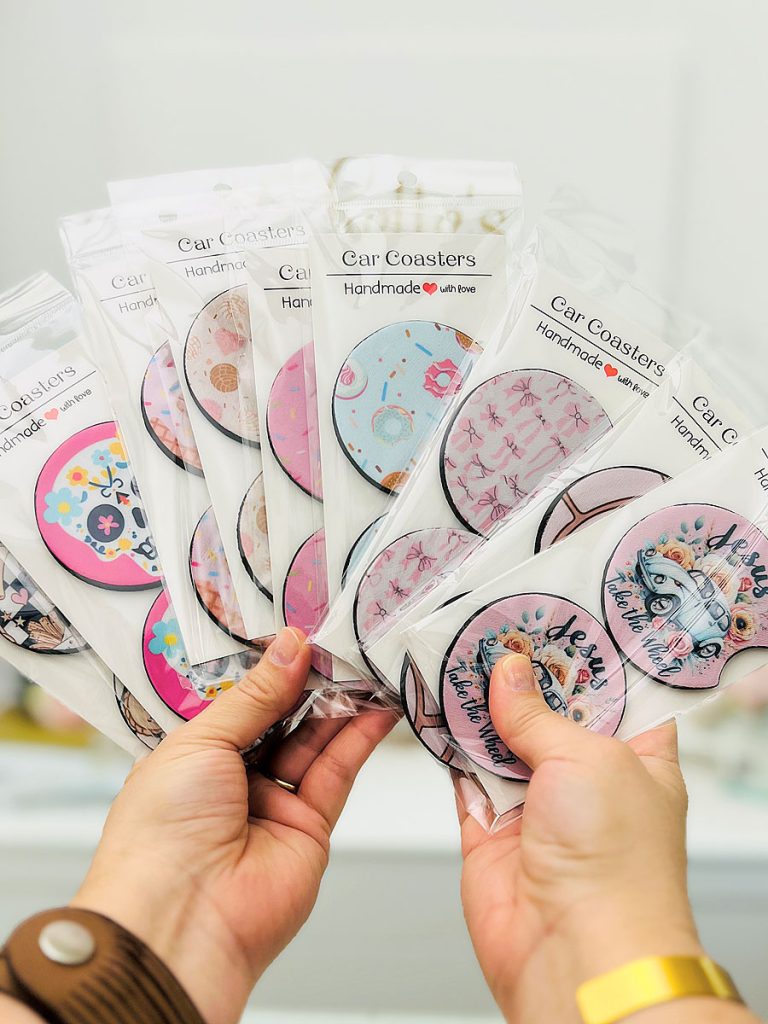
Step 9: Package the Coasters for Selling
If you plan to sell your car coasters at craft shows or markets, packaging makes a big difference in how polished the finished product looks. For this project I used these retail packaging bags.
These bags include a backer card and a hole for hanging, which makes them perfect for retail display. The backer card adds structure so the coaster stays flat inside the package, and the hanging hole allows you to display them easily on a retail rack or pegboard. Using packaging like this instantly makes the coaster look more like a finished retail product rather than a loose craft item.
To package the coaster, simply slide it into the bag with the backer card behind it. The clear front keeps the design visible while the backer card helps it hold its shape. Because the packaging already includes the card and hanging slot, you can quickly assemble multiple coasters for display without needing extra materials. You can also get a smaller set of coasters that includes the packaging if you’re just adding them to your catalog.

Step 10: Display the Coasters at Craft Shows
For my setup I used this display stand. This type of display works well for small flat products because it keeps everything visible and organized. Grouping designs by theme can also make it easier for customers to browse.
Pro Tip: Stamp the Back with Your Brand
If you plan to sell your coasters, consider adding a small stamp to the back of the packaging. You can include your logo, business name, website, or social media handle. This simple detail adds a professional touch and helps customers remember where they purchased the product.
If you’d like to try this project, don’t forget to download the free car coaster Canva template from the Studio Letter to make designing your layouts even easier.
Happy Crafting (and selling)!

- DIY Clear Acetate Composition Notebook Cover
- Peel-A-Pocket™ Adhesive Pockets for Journals, Scrapbooks, Bibles and More
- How to Customize a Half-size Composition Notebook for Bible Journaling
- DIY Bible Notes Journal from a 50-Cent Composition Notebook
- How to Design a Scrapbook Layout in Cricut Design Space
- DIY Coffee Can Storage Container