If you’ve been wanting to try sublimation on metal, this is one of the easiest ways to create a clean, finished piece of decor that looks polished without a lot of extra steps. So let’ get started!
Affiliate links may be included in this post. If you make a purchase through my links, I may earn a small commission at no extra cost to you.
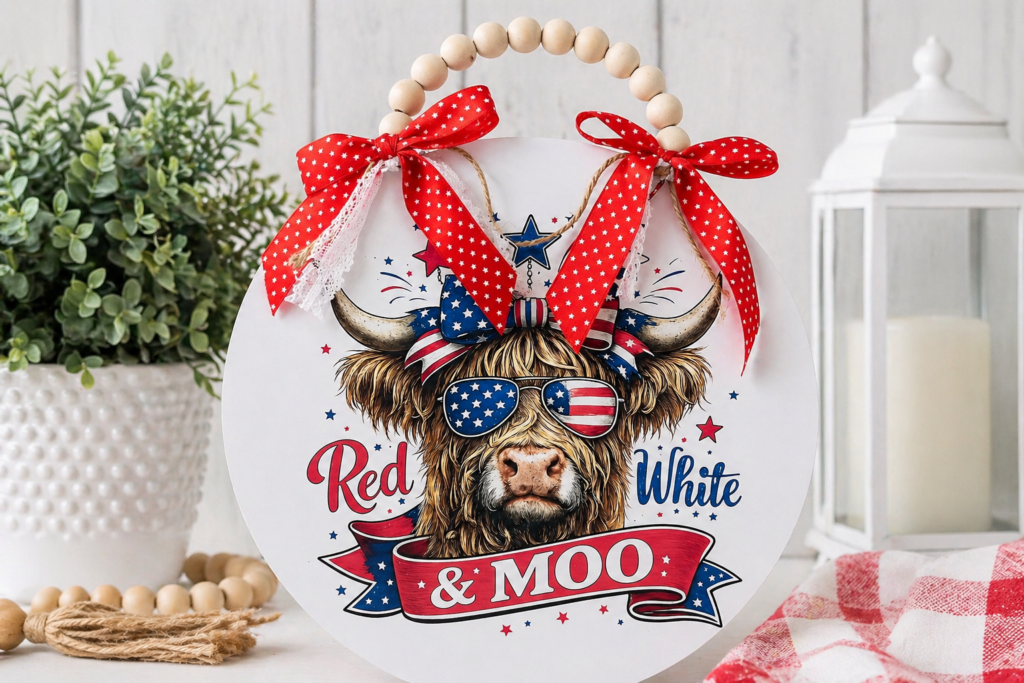
Patriotic Metal Sign with Sublimation
For this project, I’m making a patriotic metal sign using a bold red, white, and blue design and finishing it with ribbon for a simple, styled look. This works well for 4th of July decor, summer decorating, or even small business products.
This project is also part of my USA 250th Anniversary series, where I’m creating decor ideas you can use for upcoming patriotic holidays and celebrations.
Watch the Full Tutorial
What You’ll Need
12″ metal sublimation sign blank
Sublimation printer
Sublimation ink
Sublimation paper
Heat press
Heat-resistant tape
Butcher paper
Lint-free cloth or alcohol wipes
Ribbon and twine for finishing
Step 1: Prepare Your Design
For a 12″ round sign, I size my design to about 10″ x 10″ at 300 DPI. This keeps a clean margin around the edge and makes placement easier when pressing.
If you want to use the exact design I used, you can grab it here:
Step 2: Print Your Design
Print your design onto sublimation paper. Colors will look softer on paper, but they develop during the pressing process.
Trim around the design if needed so it’s easier to align on your blank.
Step 3: Prep the Metal Sign
Before pressing, remove any protective film and wipe the surface clean. Make sure it’s completely dry before placing your design.
Step 4: Heat Press Settings
For this project, I used 375°F for 65 seconds with medium to firm pressure. Let your press fully preheat before you begin.
Step 5: Line up your Design
Line up your design to center on the sign. Secure with heat resistant tape.
Step 6: Why Metal is Pressed Face Down
For metal sublimation, the printed design is placed face down onto the blank and pressed that way. Metal is highly heat conductive, so pressing face down allows the heat to move through the metal and activate the ink directly into the coated surface. This is different from other sublimation projects where you may see the design pressed face up. For metal signs, pressing print side down gives you a more even, consistent transfer.
It’s a small detail, but it makes a big difference in how clean your final result looks.
Step 7: Press the Design
Place everything into your heat press and press for 60 seconds. Don’t forget the butcher paper under and on top of your substrate. When finished, carefully remove the sign and peel back the paper to reveal the final design.
Step 8: Let It Cool
Set your sign aside and let it cool completely before handling.
Step 9: Add Ribbon and Finishing Touches
To finish the sign, I added ribbon for a decorative touch and twine for hanging. Keeping the design simple and adding detail with ribbon gives it a more styled, finished look without overcomplicating the project.

Get the Design
If you want to recreate this sign, grab the design below. You can use the design for stickers, t-shirts and more!
Happy Crafting!

- Peel-A-Pocket™ Adhesive Pockets for Journals, Scrapbooks, Bibles and More
- How to Customize a Half-size Composition Notebook for Bible Journaling
- DIY Bible Notes Journal from a 50-Cent Composition Notebook
- Cricut Printable Sticker Paper Comparison
- How to Sublimate Wood with Laminating Sheets – DIY Santa Platter
- Beach Day Checklist and Tips
- 4 Fun Father’s Day Party Themes
- DIY Wine Barrels – Easy Party Props
- Easy Pineapple Luau Centerpiece
- How to Plan a Halloween Avengers Costume Party
- It’s a Minnie Party!
- A TRON Party for Two