Let’s go down memory lane and recreate the vintage borrower’s record cards found inside library books back in the day! Today I’m sharing how to make a cute set of magnetic bookmarks using Cricut’s Print Then Cut feature and a free design you can use in your own projects. So let’s get started!
Some of the links in this post may be affiliate links. That means I may earn a small commission if you purchase through them at no extra cost to you.
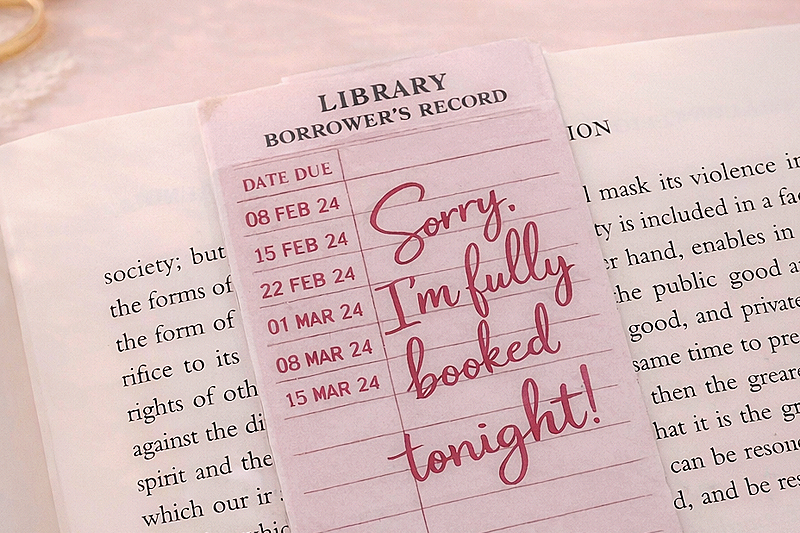
How to Make Magnetic Bookmarks with Cricut
Before libraries switched to digital systems, every book had a small card where librarians stamped the date due when it was checked out. Those cards lived in a pocket inside the back of the book and tracked every borrower.
These magnetic bookmarks instantly take me back to those days. I loved spending time in the library!
These cute magnetic bookmarks are:
- laminated on both sides
- folded over your page
- secured with magnets so they stay in place
They’re also super quick to make, durable, and perfect for book lovers, teachers, and readers.
Let’s go over the supplies you’ll need.
Materials
- Free vintage library card bookmark PNG (download below)
- Cardstock or photo paper
- Holographic self-laminating sheets
- Adhesive magnets
You can also experiment with heavyweight satin presentation paper or inkjet-compatible cover cardstock for different finishes.
Tools
- Inkjet printer
- Cricut machine (Maker, Explore, or Joy Xtra)
- Cricut Design Space
- StandardGrip Cricut mat
- Scraper or felt squeegee (I use my felt-covered ruler)
- Scoring stylus or scoring wheel
- Scissors or paper trimmer
For this project I used adhesive magnets. Magnet strength can vary quite a bit, so I recommend testing a few options to find the magnets that work best for your bookmarks.
Download the Free Library Card Bookmark Design
The design used in this tutorial is inspired by the classic library borrower’s record cards from the 1980s.
It includes:
- the vintage library card layout
- due date columns
- and the phrase “Sorry, I’m fully booked tonight!”
When folded, the bookmark resembles the cards that used to sit inside the back cover of library books.
Download the free bookmark design here.
Once downloaded, you’ll upload the PNG file to Cricut Design Space to create the Print Then Cut project.
Want to see this project in action? Check out the video below:
Step 1: Upload the Bookmark Design to Cricut Design Space
Open Cricut Design Space and start a new canvas.
Upload the image as a flat graphic and insert it onto your canvas.
Step 2: Resize the Bookmark
Once the design is on your canvas, resize it to your preferred bookmark size.
For magnetic bookmarks, I recommend a finished size of approximately 2 inches wide by 4–5 inches tall.
This gives you enough space to fold the bookmark over a page while leaving room for the magnets.
Step 3: Add an Offset for Cutting
To give the bookmark a clean finished edge, add an offset.
Select the bookmark image.
Click Offset in the top toolbar and adjust the offset slightly until a smooth border appears around the design.
Once you’re happy with the border, select both the image and the offset and click Flatten.
Flattening converts the design into a Print Then Cut layer so Cricut knows to print the design first and then cut around it.
Step 4: Add a Score Line
Next, add a score line where the bookmark will fold.
Insert a line from the Shapes panel and place it across the center fold area of the bookmark.
Resize the line so it spans the width of the bookmark.
Change the line type from Cut to Score.
Select both the bookmark design and the score line and click Attach so the score line stays in place when the design cuts.
Step 5: Prepare the Print Then Cut Layout
Click Make in Cricut Design Space.
You’ll see your bookmark arranged on a Print Then Cut sheet with Cricut registration marks around the design.
Before printing, check the material size settings to make sure they match the paper you’re using.
Then select Send to Printer.
Step 6: Print the Bookmark Design
Print the bookmark sheet using your inkjet printer.
For best results:
- use high quality print settings
- print on printable sticker paper or cardstock
Allow the ink to dry completely before moving to the next step.
Step 7: Apply Holographic Self-Laminate
To protect the bookmark and give it a little sparkle, apply holographic self-laminate over the printed sheet.
To apply the laminate:
- Peel back a small section of the laminate backing.
- Align the laminate with the printed sheet.
- Slowly smooth it down using a scraper or squeegee.
- Work from the center outward to remove bubbles.
I also laminate the back side of the sheet. This makes the finished bookmark more durable and helps it hold its shape when folded.
Step 8: Cut the Bookmarks with Cricut
Insert your scoring tool in the adapter.
Place the laminated sheet onto your Cricut Standard Grip mat.
Load the mat into your Cricut machine.
In Design Space select a Heavy Cardstock setting. Turn More Pressure on if needed.
Because the laminate adds a little thickness, you may need to adjust the pressure slightly for a clean cut.
Press the Go button and allow your Cricut to cut around each bookmark.
Once finished, remove the bookmarks from the mat.
Step 9: Add the Adhesive Magnets
Now it’s time to turn the bookmarks into magnetic page clips. I recommend using adhesive magnetic sheets for this project, they’re easy to cut, beginner-friendly, and strong enough to hold your place without damaging your pages.
Turn the bookmark over so the back side is facing up.
Place one adhesive magnet near the top of one half.
Place the second magnet directly across from it on the other half.
Make sure the magnets line up so they connect when the bookmark folds.
Step 10: Fold the Bookmark
Fold the bookmark on the scoring marks.
The magnets will hold the bookmark closed and allow it to clip securely over a page in your book. Because the bookmark is laminated on both sides, it will feel sturdy and hold its shape well.

Great for Gifts or Craft Fairs
Magnetic bookmarks are also a great small project to sell or gift.
They’re perfect for:
- teachers
- students
- book clubs
- librarians
- reader gift baskets
They’re inexpensive to make and easy to produce in batches.
If you’re making them for yourself, sharing them with friends, or adding them to your handmade products, these bookmarks are a great little project!
Happy crafting!


- How to Make a Reusable Sticker Sheet from Sticker and Laminate Backing Sheets
- DIY Clear Acetate Composition Notebook Cover
- Peel-A-Pocket™ Adhesive Pockets for Journals, Scrapbooks, Bibles and More
- How to Customize a Half-size Composition Notebook for Bible Journaling
- DIY Bible Notes Journal from a 50-Cent Composition Notebook
- How to Design a Scrapbook Layout in Cricut Design Space