If you’ve been looking for a meaningful laser engraving project that also makes a beautiful handmade gift, this custom faux leather Bible journal is one of my favorite projects I’ve made lately. I used my WeCreat Vista 10W laser machine along with a laser-ready journal cover from MakerFlo to create a personalized engraved journal and matching corner bookmark for my son. Let’s get started!
I received the journals from MakerFlo, all opinions are 100% my own. Some of the links in this post may be affiliate links – That means I may earn a small commission if you purchase through them at no extra cost to you. I only recommend products I personally use in my projects.

How to Make a Custom Faux Leather Bible Journal with the WeCreat Vista 10W
What I love about this project is that it combines personalization, laser engraving, and gift giving into something that feels truly special. The faux leather engraves beautifully, the finished result looks high-end, and the matching bookmark makes it feel even more complete.
This project would work well for:
- Father’s Day gifts
- Graduation gifts
- Personalized journals
- Faith-based gifts
- Pastor appreciation gifts
- Handmade market products
- Small business laser projects
And because these journal covers lay completely flat, you have a lot of flexibility with your engraving designs.
Supplies Used
For this project I used:
- WeCreat Vista 10W laser machine
- Laser-ready faux leather journal cover from MakerFlo
- Faux leather corner bookmark
- PNG engraving design
- Baby wipes
- Soft dry cloth
The journal covers are designed specifically for laser engraving and came in several colors. For this project, I chose the rawhide color.
Learn more about the WeCreat Vista in my other blog post HERE.
Watch full video below:
Preparing the Journal for Engraving
The first thing I did was remove the notebook insert from the faux leather cover. This is an important step because you want the surface to lay as flat as possible inside the laser machine.
A flat surface helps ensure:
- Cleaner engraving
- More consistent focus
- Sharper details
- Better alignment

Once the notebook insert was removed, I placed the journal cover inside my WeCreat Vista laser.
Setting Up the Design in WeCreat Software
After placing the journal into the machine, I moved over to the computer and uploaded my PNG design into the WeCreat software.
The design included:
- A compass graphic
- Mountain details
- Pine trees
- Decorative flourishes
- The scripture “Be Strong & Courageous”
- Joshua 1:9
I resized the design and positioned it so it was centered on the journal cover as evenly as possible.

One thing I like to do before engraving is repeatedly use the refresh and auto measure features inside the software. This helps make sure the material placement is accurate before starting the project.
Because faux leather covers are flexible materials, they may not always sit perfectly straight, so taking a few extra moments to line everything up is worth it.
My Engraving Settings
For this project, I selected the 2 mm PVC leather material setting inside the WeCreat software.
The engraving settings used were:
- 100% power
- 305 speed
- 1 pass
- 100 line density
Since my design was uploaded as a PNG file, it engraved as a bitmap image.
Before starting the project, I previewed the engraving one last time to confirm placement and sizing.
The engraving itself took approximately 15 minutes to complete.
Engraving the Faux Leather Journal
Once the file was ready, the software prompted me to close the lid and push the start button on the machine.

One thing I really liked about this project was how crisp the engraving looked against the warm faux leather background. The black engraved areas created a bold contrast that made all of the details stand out beautifully.
The compass design especially engraved very cleanly, even with the smaller details and fine lines.
Cleaning the Engraved Journal
After engraving, there was a small amount of residue left on the journal surface, which is completely normal with faux leather engraving.
To clean it up, I used:
- A baby wipe to remove the dust
- A soft dry cloth to finish it off
The residue wiped away very easily and revealed the final engraved design underneath.

The finished journal turned out beautifully and looked very polished once the notebook insert was placed back inside.
Creating the Matching Corner Bookmark
To coordinate with the journal, I also engraved a faux leather corner bookmark.
This bookmark is another blank I already had on hand. I added a small engraved design and used a card underneath the bookmark to help keep it straight inside the laser machine.
For the bookmark, I used the same laser settings as the journal cover.

The engraving process for the bookmark took less than one minute.
What surprised me most was how clean the tiny engraved text came out. Even though the details were very small, everything remained sharp and readable.
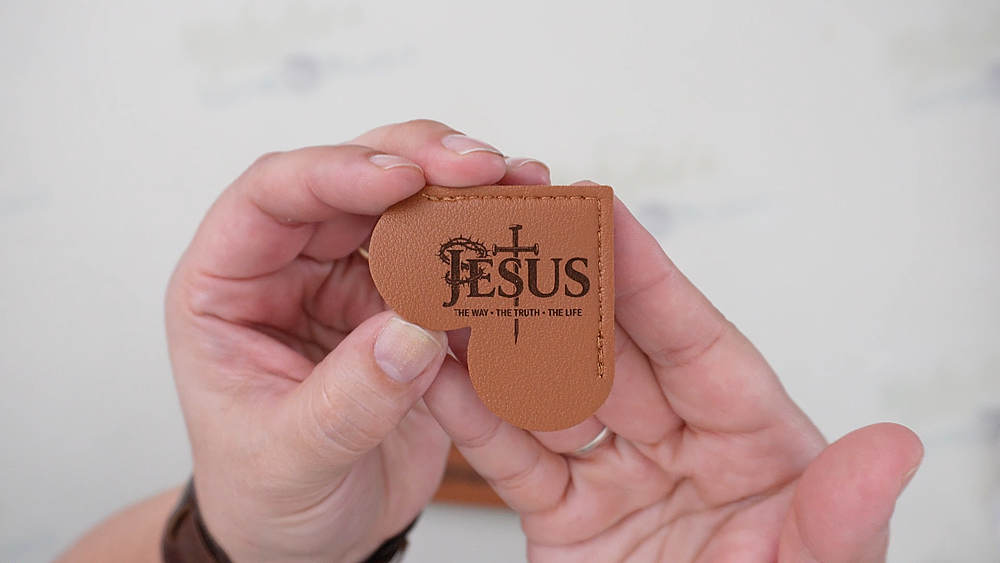
The bookmark added a really thoughtful finishing touch to the project and made the entire gift set feel more complete.
Laser Safety and Ventilation
During the bookmark engraving process, I had both my ventilation fans and air purifier running.
Good ventilation is extremely important when using laser machines, especially when engraving faux leather or other synthetic materials.
Always make sure:
- Your workspace is properly ventilated
- Your exhaust system is functioning correctly
- You follow your machine manufacturer’s safety recommendations

Ideas for Personalizing These Journals
One reason I really like these faux leather journal covers is because they can lay flat inside the laser machine.
That opens up a lot of possibilities for customization.
You could engrave:
- Front and back covers
- Full wraparound designs
- Spine details
- Names or initials
- Inside messages
- Scripture verses
- Business logos
- Custom artwork
I also plan to engrave a personal message inside the journal later. That’s one of the things I love most about personalized laser gifts. They can become keepsakes that feel truly meaningful.
Small Business Potential
This type of project also has strong small business potential.
Custom engraved journals and bookmarks work well for:
- Craft fairs
- Etsy shops
- Boutique gifts
- Graduation season
- Father’s Day
- Christmas gifts
- Church events
- Personalized gift orders
The bookmark project in particular would be easy to batch produce quickly.
You could create multiple coordinating designs in a short amount of time using the same engraving settings.

I absolutely love how this engraved faux leather journal turned out. The warm rawhide color paired with the engraved compass and scripture design created a project that feels both rustic and meaningful.
The matching corner bookmark made it feel even more special and elevated the overall presentation.
If you enjoy personalized laser projects, faux leather engraving is definitely something worth trying. The results look professional, the materials engrave beautifully, and the possibilities for customization are endless.
Happy Crafting!


2 comments
Michelle would you happen to have this design listed for sale somewhere? Absolutely beautiful
Aw, thank you for asking! I made it with my son’s initials, so I don’t have it listed anywhere.