If you love budget-friendly Cricut projects that look way more expensive than they are, this one is going to be right up your alley. These Dollar Tree vinyl record coasters are such a fun blank, especially if you want to create a personalized gift, themed room decor, or a custom coaster set for a music lover.
I recently made a set using images inspired by my son’s favorite band, and they turned out SO good. In this tutorial, I’m walking you through the entire process step by step, so let’s get started!
Disclosure: This post contains affiliate links and I will be compensated if you make a purchase after clicking on my links, at no additional cost to you.

This is a beginner-friendly Print Then Cut project, but I’m also sharing the little details that make a big difference, especially if you plan to actually use these as coasters.
Why Dollar Tree Vinyl Record Coasters Are Perfect for Cricut Projects
First of all, let’s talk about the coaster base itself. The Dollar Tree vinyl record coaster set comes with 5 coasters for $1.50, which is kind of a steal.
Here’s why I love using these for customization:
- The size is consistent and easy to design for
- The removable center labels make them customizable
- The vinyl surface works great with stickers
- They’re lightweight but sturdy
- Perfect for gifts, teens’ rooms, dorms, or themed spaces
Supplies You’ll Need
Here’s everything I used for this project:
- Dollar Tree Vinyl Record Coaster Set (5-piece pack)
- Cricut cutting machine (Explore, Maker, or Joy Xtra)
- Inkjet printer
- Cricut Design Space
- Printable sticker paper
- Self-adhesive laminating sheets (very important for coasters)
- Cricut cutting mat
- Uploaded images or graphics (band logos, album-inspired art, etc.)
Sticker Size & Design Specs (Important)
Before jumping into Design Space, it’s important to get the sizing right so everything lines up perfectly on the coaster.
Here are the exact measurements I used:
- Outer sticker diameter: 2 inches
- Center circle cutout: 0.5 centimeters

Step 1: Remove the Original Labels from the Coasters
Start by flipping each coaster over and gently peeling off the original paper label from the center. Most of them come off pretty easily.
If there’s any sticky residue left behind:
- Add a small amount of rubbing alcohol to a paper towel
- Wipe the surface until it’s completely clean
- Let the coaster dry fully before applying stickers
This step is important because any leftover residue can prevent your new sticker from sticking properly.
Step 2: Upload Your Images into Cricut Design Space
Open Cricut Design Space and click Upload → Upload Image.
Here’s what I recommend when choosing images:
- Use high-resolution images when possible
- Simple, bold designs work best at small sizes
After uploading:
- Remove the background if needed
- Save the image as a Print Then Cut image
- Insert it onto your canvas
Repeat this process for each design you want to use.

Step 3: Create the Vinyl Record Sticker Shape
This is where the magic happens.
- Insert a circle shape and size it to 2 inches
- Insert a second circle and size it to 0.5 cm
- Center-align both circles
- Select both circles and click Slice
You’ll now have a donut-shaped piece that looks just like a record label.
Next:
- Place your uploaded image behind the sliced shape
- Resize and center the image until it looks balanced
- Select everything and click Flatten
Flattening is essential, this tells Cricut you want this to print as one image and then cut around it.
Step 4: Print Your Stickers (Before Cutting)
Before you can cut anything with your Cricut, your stickers need to be printed first. This is an important step in the Print Then Cut process, and it’s where a lot of beginners get tripped up.
Here’s how to do it correctly:
- In Cricut Design Space, make sure all of your sticker designs are Flattened
- Click Make It
- Design Space will prompt you to send the project to your printer
- Select your inkjet printer
- In your printer settings:
- Set print quality to Best or High
- Make sure scaling is set to 100% (no resizing)
- Use the correct paper setting for your sticker paper
- Print the sticker sheet onto your printable sticker paper
Once printed, set the sheet aside and allow the ink to dry for 10–15 minutes before moving on. This drying time is important to prevent smudging, especially before laminating.
Step 5: Prepare Stickers for Coaster Use (Do Not Skip This)
If you’re planning to actually use these as coasters, laminating your stickers is non-negotiable.
Why?
- Coasters deal with condensation
- Inkjet ink is not waterproof
- Laminate protects against smudging and fading
How to Laminate Printable Stickers
- Print your sticker sheet on printable sticker paper
- Let the ink dry for at least 10–15 minutes
- Apply a self-adhesive laminating sheet over the printed page
- Use a scraper to smooth out bubbles
This extra step makes a huge difference in durability.

Step 5: Cut Stickers Using Print Then Cut
Once laminated:
- Place the sheet onto a Cricut mat
- Load it into your machine
- Choose the appropriate material setting (Printable Vinyl or Sticker Paper + Laminate)
- Start the Cut process

When cutting is complete:
- Remove the stickers from the mat

Step 6: Apply Stickers to the Vinyl Record Coasters
Now for the satisfying part.
- Line up the sticker with the center of the coaster
- Start pressing from the middle outward
- Smooth with your fingers or a scraper to remove air bubbles
For best results, let the stickers cure for 24 hours before using the coasters.
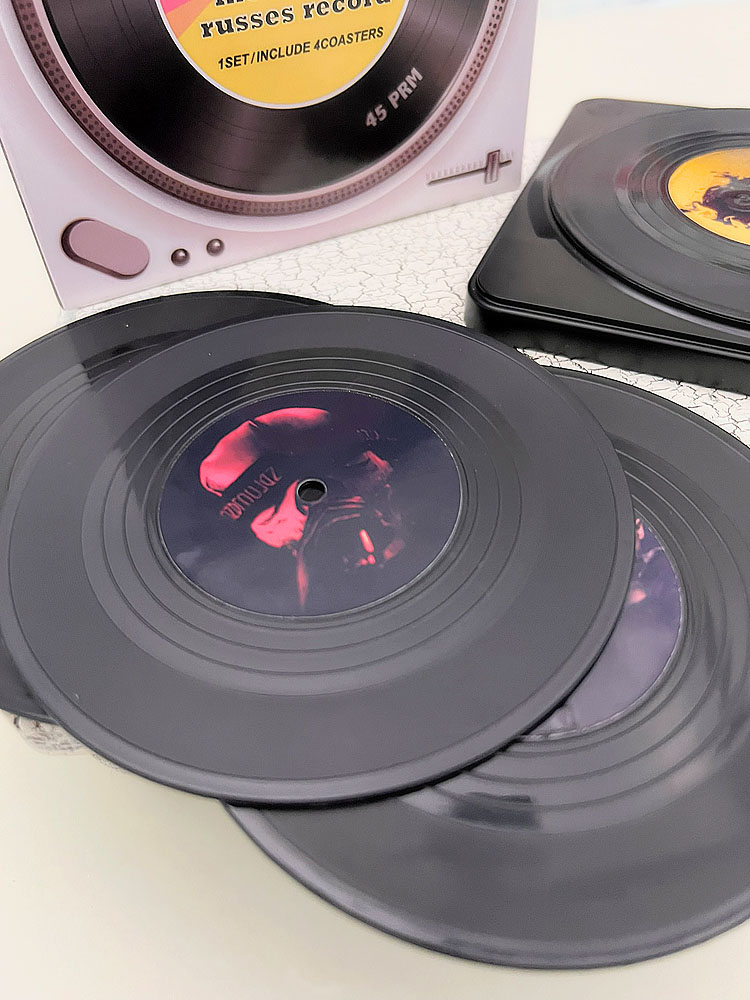
Finished Results & Gift Ideas
Once finished, you’ll have a fully customized vinyl record coaster set that looks store-bought, but costs a fraction of the price.
These make amazing gifts for:
- Music lovers
- Teen bedrooms
- College dorms
- Father’s Day or Mother’s Day
- Birthdays
- Band-themed rooms
You can also use this same technique for sports teams, movies, retro designs, or holiday themes. They also make great party favors!

Pro Tips for Best Results
- Burnish laminate well before cutting
- Avoid soaking, these are water-resistant, not waterproof
- This is a great beginner Cricut Print Then Cut project
@michellespartyplanit My youngest is the biggest @twenty one pilots ♬ City Walls – twenty one pilots
This Dollar Tree vinyl record coaster hack is one of those projects that checks all the boxes: affordable, customizable, and totally gift-worthy. Whether you’re making them for your own home or as a personalized gift, the results are impressive, especially when you take the extra step to laminate your stickers.

If you love creative Cricut projects like this, be sure to save this tutorial and try it with your own favorite themes!
Happy crafting!

- How to Make a 3D Composition Notebook with Cricut
- What Caught My Attention at PRINTING United Expo 2026
- How to Emboss Acetate and Composition Notebook Covers
- How to Make a Reusable Sticker Sheet from Sticker and Laminate Backing Sheets
- DIY Clear Acetate Composition Notebook Cover
- Peel-A-Pocket™ Adhesive Pockets for Journals, Scrapbooks, Bibles and More