If you’re not ready to invest in a DTF printer but want to decorate cotton shirts, there’s a simple workaround. Sublimation normally only works on polyester fabrics or polymer-coated surfaces. But by adding a layer of glitter heat transfer vinyl (HTV), you can sublimate vibrant designs onto cotton shirts and tote bags.
In this tutorial I’ll show you exactly how the process works, so let’s get started!
Updated for Cricut Design Space changes:
This tutorial has been refreshed with updated screenshots and steps to match the current version of Cricut Design Space.
Disclosure: This post contains affiliate links and I will be compensated if you make a purchase after clicking on my links, at no additional cost to you. #cricutmade

How to Sublimate on Cotton with Glitter HTV
Are you wanting to sublimate something besides 100% polyester? I’m excited to show you this fun sublimation trick where you can sublimate on 100% cotton items using glitter iron on vinyl! This method can be done on t-shirts, canvas, wood (see how I did it here with a Santa’s Snack Plate) and so much more!
What you will need:
Cricut Machine (I use my Cricut Explore 3)
Heat Press (I use my HTVRONT Auto Heat Press 2)
Cotton or Canvas Drawstring Bag (I got mine from Oriental Trading Company)
Design of your choice – I use Creative Fabrica
Ok, let’s start with the process in Cricut Design Space:

Step 1: Upload Your Design
Open Cricut Design Space and upload your PNG design with a transparent background.
Insert the design onto your canvas and resize it to fit your drawstring bag or project surface. Cricut Design Space will let you know if you need to resize it for the print then cut feature.

Step 2: Add an Offset Border
Next, create a slightly larger border that will be used as the HTV base layer.
-
Select the design on your canvas.
-
Click Offset in the top toolbar.
-
Adjust the offset distance to create a border around the design.
-
Click Apply.
You should now see a larger outline surrounding your original design. Change the offset color to white.

Step 3: Create the Sublimation Print File
Select both the original design and the offset layer.
Click Flatten.
Flattening combines the design and the offset into a single Print Then Cut image. This is the file that will be printed on your sublimation printer.

Step 4: Duplicate the Image
With the flattened image selected, click Duplicate.
You will now have two identical images on the canvas.
One will be used for sublimation printing and the other will become the HTV cut file.

Step 5: Create the HTV Base Layer
Select the duplicated image.
Click Unflatten in the Layers panel.
You will now see the design and the offset separated again.
Delete the original design layer, leaving only the offset shape.
This offset shape will become the base layer cut from glitter HTV.

Step 6: Change the Operation to Basic Cut
Select the offset layer.
Change the Operation setting to Basic Cut.
This tells the Cricut to cut the shape from your glitter HTV.
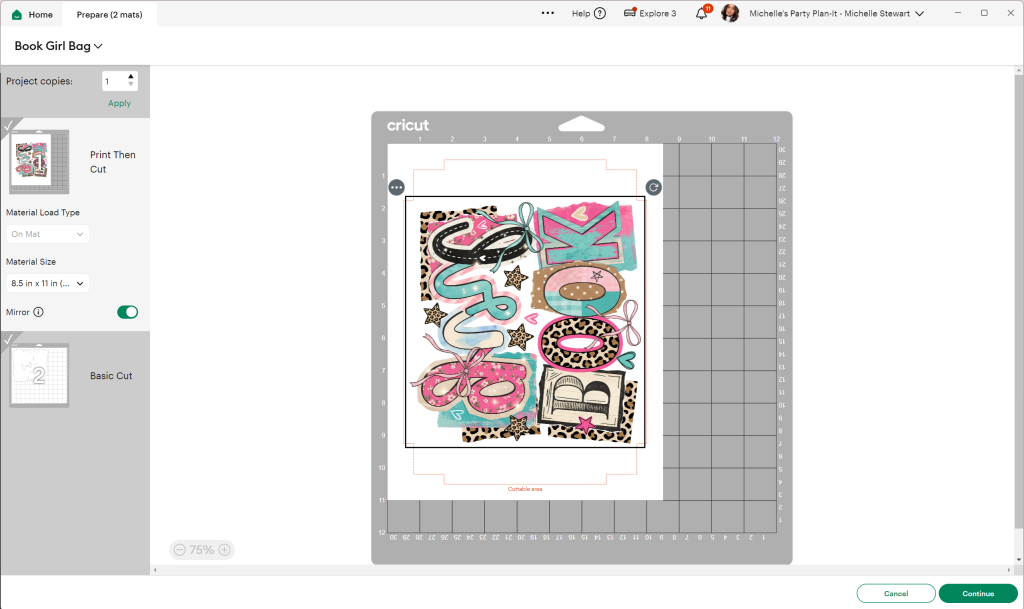
Step 7: Cut the Sublimation Print and Glitter HTV
Once your files are prepared in Cricut Design Space, click Make.
Cricut Design Space will separate the two layers:
• the Print Then Cut sublimation image
• the Basic Cut glitter HTV offset
Make sure both are MIRRORED.
Start with the Print Then Cut layer.
-
Load printable sublimation paper into your sublimation printer.
-
Click Send to Printer in Cricut Design Space.
-
Print the design, making sure bleed is turned off for crisp edges.
After printing, place the printed sheet on your LightGrip Cricut mat and load it into your Cricut machine.
Follow the prompts in Design Space and allow the Cricut to cut around the printed design.

Next, cut the glitter HTV layer.
Place your glitter HTV shiny side down on the mat and load it into the Cricut.
Select the appropriate material setting for glitter HTV and allow the Cricut to cut the offset shape.
Once the cut is complete, remove the HTV from the mat and weed away the excess vinyl, leaving only the offset base layer that will be pressed onto the bag.

You will now have two pieces ready for pressing:
• the printed sublimation design
• the glitter HTV offset base
Step 8: Prepare and Pre-Press the Bag
Before applying the HTV, it’s important to remove moisture and wrinkles from the cotton fabric.
Lay the drawstring bag flat on your heat press. If the bag has seams or drawstring knots that create uneven pressure, place a pressing pillow or folded towel inside the bag to create a smooth pressing surface.
Insert a sheet of butcher paper or parchment paper inside the bag to protect the back layer of fabric.
Pre-press the bag for 5–10 seconds to remove moisture and wrinkles.
Step 9: Press the Glitter HTV Base Layer
Position the glitter HTV offset shape onto the bag where you want the design to appear.
Make sure:
• the HTV is smooth and flat
• the carrier sheet is facing up
Cover with parchment paper or a protective sheet.
Press the glitter HTV at:
330°F for 30 seconds
Apply firm, even pressure.
After pressing, allow the carrier sheet to cool slightly and then carefully peel it away.
The glitter HTV layer will now act as the polyester surface for sublimation.

Step 10: Align the Sublimation Transfer
Place the printed sublimation design directly on top of the glitter HTV base.
Take a moment to carefully line up the edges of the printed design with the HTV shape.
Once aligned, secure the sublimation paper using heat-resistant tape to prevent it from shifting during pressing.

Step 11: Press the Sublimation Design
Increase your heat press temperature to:
400°F for 60 seconds
Place a sheet of butcher paper or parchment paper over the sublimation print to protect your heat press.
Press the design for the full 60 seconds with firm, even pressure.

Step 12: Reveal Your Finished Design
When the press cycle is complete, carefully remove the sublimation paper while it is still warm.
Your sublimation design will now be permanently transferred onto the glitter HTV layer, allowing vibrant colors to appear on your cotton bag.
Allow the design to cool before handling.

Look at the detail! I love the added glitter, and best of all it’s no mess! No sprays, no powders needed!
I hope you try out this technique to make an array of sublimation crafts! If you do, please tag me on social media @michellespartyplanit, I’d love to see what you create!
Need more sublimation ideas? Check out these favorites…
HOW TO SUBLIMATE A MOUSE PAD
HOW TO SUBLIMATE A PILLOW COVER | LOVE LETTER FROM JESUS PILLOW
DIY VALENTINE’S DAY DOG BANDANA
SUBLIMATION OVEN OR CRICUT MUG PRESS – WHICH IS BEST?
HOW TO SUBLIMATE FAUX LEATHER
Happy Crafting!

PIN FOR LATER!


- Unlocking Sublimation: A Guide to Sublimation
- Sublimation Oven or Cricut Mug Press – Which is Best?
- HTVRONT Auto Heat Press Product Review
- Cricut Maker VS Cricut Maker 3 – Which Cricut Machine is Right for you?
- Cricut Glue Gun Product Review
- How to Sublimate Frosted Glass Can Tumblers with the Cricut Mug Press
- How to Sublimate Tumblers with the Cricut Mug Press
- How to Sublimate on Wood With or Without a Sublimation Printer
3 comments
In your recap you say,
Set your heat press to 330 degrees for 30 seconds. Center the HTV on your design and press.
Is this for a pre press to remove moisture? Or is this how long you press the glitter? Most I’ve seen say to press the vinyl, glitter vinyl etc for just a few seconds is why I ask. I prefer written instructions as well as videos. Thank you in advance for clarifying.
This is the pressing time and temp for the glitter.
How to sublimate on dark shirts using HTV matte and what setting to use to cut it.