A custom cake topper is one of the easiest ways to personalize a birthday cake, and with Cricut Design Space, you can create stunning layered designs that add dimension and professional-looking detail to your party decorations. Let’s get started!
Some of the links in this post may be affiliate links – That means I may earn a small commission if you purchase through them at no extra cost to you. I only recommend products I personally use in my projects.
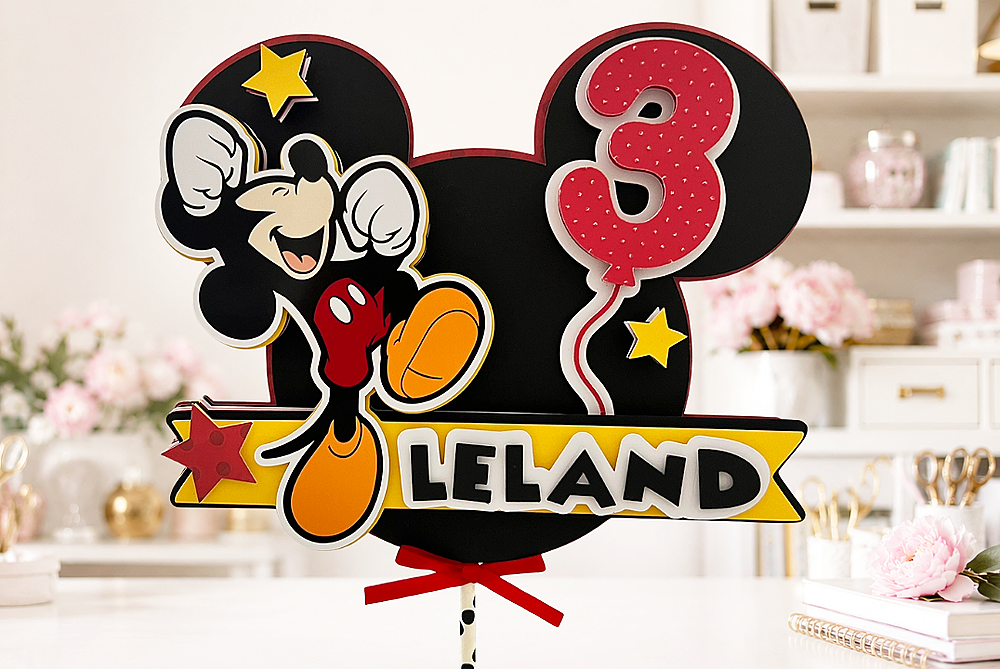
How to Make a Layered Cake Topper with Cricut Design Space
For today’s project, I’m sharing how I created a layered paper cake topper using Cricut Design Space, cardstock, patterned paper, and dimensional foam adhesive. This technique can be used for birthday parties, baby showers, graduations, holidays, and virtually any celebration you can imagine.
The best part? Once you learn the layering method, you can apply it to almost any design in Cricut Design Space.
Supplies Needed
- Cricut cutting machine
- Cricut Design Space
- LightGrip Machine Mat
- Medium Cardstock
- Patterned Paper
- Glossy Photo Cardstock (for Print Then Cut elements)
- Foam Adhesive Squares or Foam Tape
- Paper Straw or Cake Topper Stick
- Hot Glue Gun
- Sizzix Big Shot and Embossing Folder (optional)
See the full video tutorial below:
Getting Started:
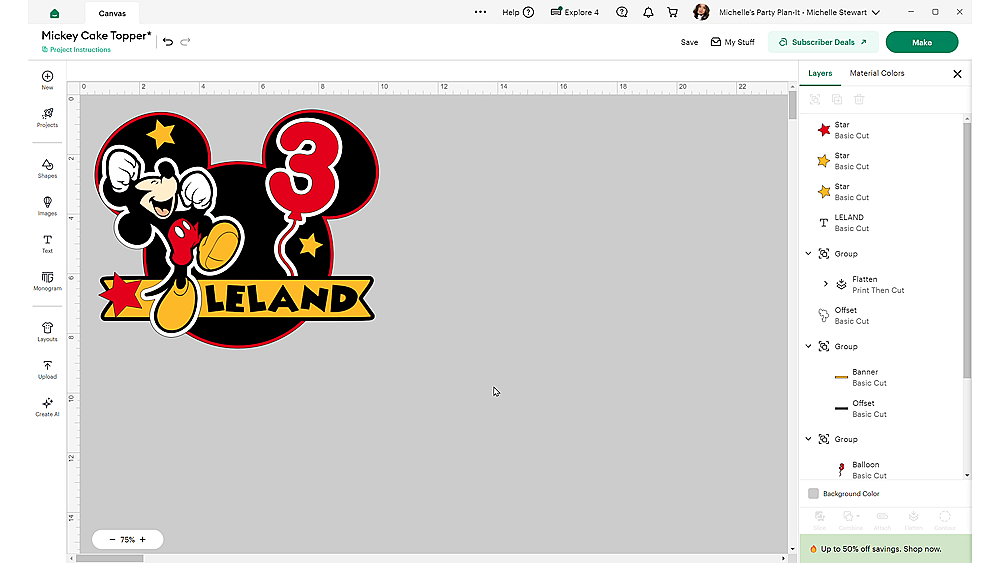
Step 1: Create Your Design in Cricut Design Space
Start by creating your design in Cricut Design Space. Arrange all of your design elements exactly how you want them to appear in the finished topper.
For this project, I included layered shapes, stars, a balloon, a personalized name element, and a printable image. Before moving forward, make sure all of your cardstock pieces are set to Basic Cut.
If your design includes a Print Then Cut element, temporarily hide it while creating the layered background pieces.
This makes the next steps much easier.
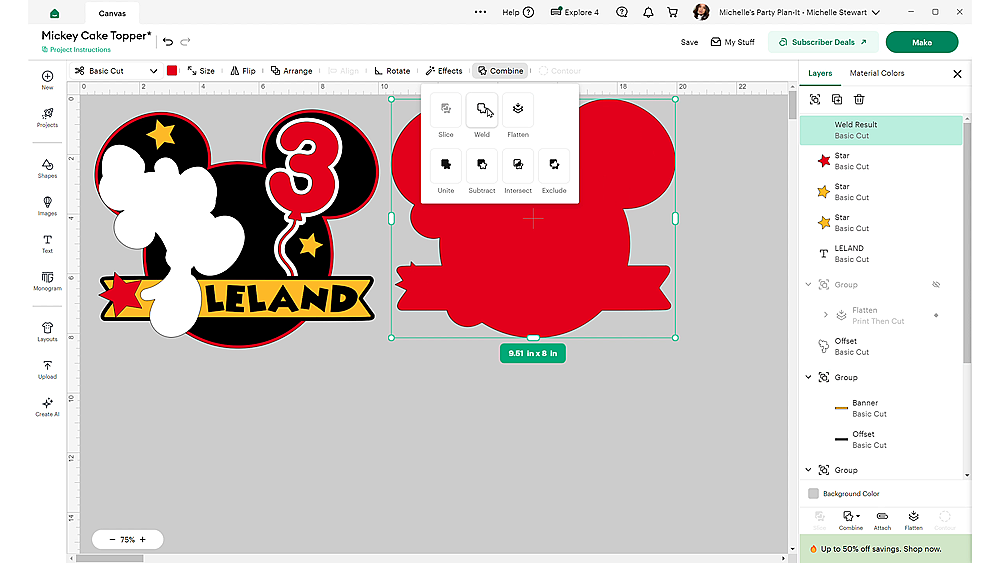
Step 2: Create the Layered Background Pieces
The secret to creating a dimensional cake topper is building offset-style layers from the original design.
Select all of the visible cardstock elements.
Click:
Duplicate → Combine → Weld
This creates a single solid layer that follows the outside edge of your design.
Once the welded layer is complete:
- Hide the welded layer.
- Select the remaining design elements.
- Duplicate and Weld again.
- Hide that layer.
- Continue repeating the process.
Each time you duplicate and weld, you’ll create another layer for your topper.

I like to stack the layers on top of each other while working so I can easily visualize how the finished topper will look.
After you’ve created all of your layers, unhide any Print Then Cut elements and place them back on top.
Step 3: Prepare Your Mats
Once you’re happy with the design, click Make It.
Review each mat carefully.
This is a great time to:
- Change cardstock colors
- Substitute patterned paper
- Rearrange pieces
- Verify your layer order
For this project, I used:
- Patterned paper for the back layer
- Red polka dot cardstock accents
- Glossy photo cardstock for the printable element
Using patterned paper on the back creates a finished look from every angle.

Step 4: Cut the Pieces
Load your materials and cut each layer.
I used Medium Cardstock settings for most of the project and Print Then Cut settings for the printable element.
When cutting cardstock, I recommend using a LightGrip mat to help prevent tearing and reduce residue on the back of your paper.
Continue cutting all layers until every piece is ready for assembly.

Step 5: Add Texture for Extra Dimension
To make the topper even more interesting, I embossed one of the balloon elements using a Sizzix embossing folder.
Embossing is optional, but it adds texture and visual interest to cardstock projects.
You can emboss:
- Balloons
- Background layers
- Numbers
- Banners
- Decorative accents
Even a subtle embossed pattern can make your cake topper feel more professional.

Step 6: Assemble the Layers
Now comes the fun part.
Open your design in Cricut Design Space and use it as an assembly guide.
Work from the bottom layer upward.
Apply foam adhesive squares between every layer to create depth and dimension.
This technique transforms a flat paper design into a true layered cake topper.
As you assemble:
- Check placement frequently
- Compare against your Design Space file
- Keep layers centered
- Add dimensional adhesive wherever needed
I also added dimensional foam behind the stars and balloon to make them stand out even more.
Step 8: Attach the Cake Topper Stick
Once the design is completely assembled, attach your topper stick.
I used a decorative paper straw, but you can also use:
- Plastic sticks
- Acrylic rods
- Wooden skewers
- 3D printed supports
I like attaching the support stick between the thickest layers of the topper using hot glue.
This keeps it secure while hiding the attachment point.
Make sure the stick is centered before the glue sets.
Step 9: Add Finishing Touches
The final step is embellishing.
For this project, I added a small decorative bow for extra detail.
You could also add:
- Ribbon streamers
- Glitter accents
- Sequins
- Shaker elements
- Pearls
- Rhinestones
These finishing touches help make your cake topper unique.
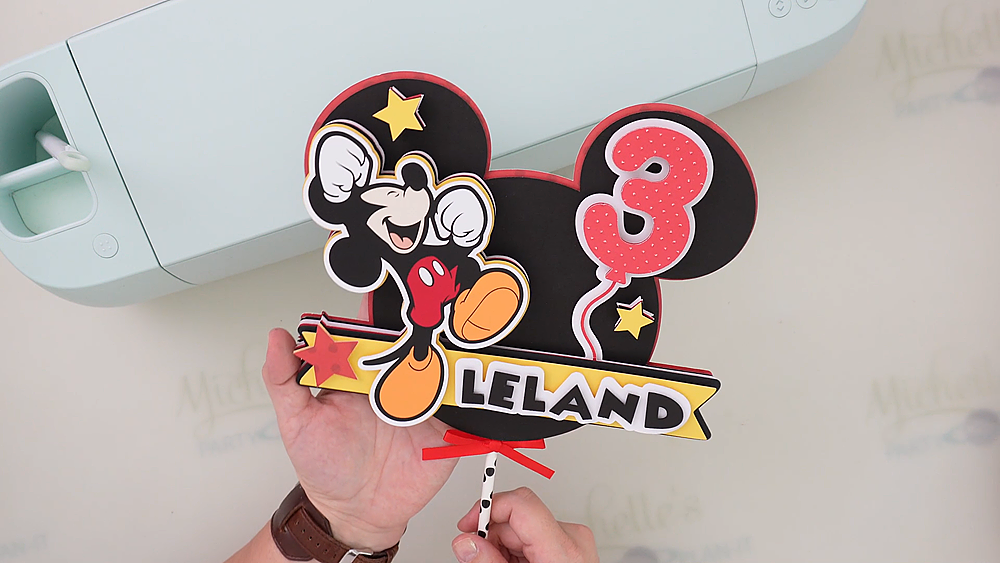
Finished Layered Cake Topper
Once assembled, the finished topper has incredible depth and dimension.
Every element is elevated using foam adhesive, creating a truly three-dimensional appearance that looks beautiful on a birthday cake, centerpiece, or party display.
One of my favorite things about this technique is how versatile it is. You can adapt it for nearly any theme and create custom decorations that perfectly match your celebration.
Have you made layered cake toppers before? Let me know in the comments, and if you’d like to see a tutorial on creating shaker-style cake toppers, be sure to tell me below!
Happy Crafting!


- How to Print Your Own Fabric with DTF
- xTool WonderPress Review: My New Favorite Heat Press?
- xTool Apparel Printer Plus Review: Have I Found My New Favorite DTF Printer?
- How to Make a 3D Composition Notebook with Cricut
- What Caught My Attention at PRINTING United Expo 2026
- How to Emboss Acetate and Composition Notebook Covers